By default, appointment slots are spaced 30 minutes apart (e.g., 9:00, 9:30, 10:00). You can customize how time slots are generated by changing the slot type in the booking system.
What is a Stepper?
Stepper (or Interval): This is the amount of time between the start of each appointment slot.
Example: If the stepper is 30 minutes, your time slots will start every 30 minutes, like 9:00 AM, 9:30 AM, and 10:00 AM. If someone books a 9:00 AM to 10:00 AM appointment, the 9:30 AM slot won’t be available, but the next open slot would be 10:00 AM.
What is a Buffer?
Buffer: This is extra time added between appointments to give a break or allow time for travel.
Example: If the buffer is 30 minutes and someone books a 9:00 AM to 10:00 AM appointment, the next available time slot would start at 10:30 AM instead of right after the first appointment.
Note: A time slot is only unavailable when no employees are available for that time. For example, if two employees are available for a 9:00 AM appointment and one is booked, the 9:00 AM time slot will still be available since the other employee can take an appointment at that time.
Time Slot Types
There are four different slot types to choose from. Let’s take a closer look at each one.
Stepper: This time slot type offers the most slot variations but does not add extra time between appointments. This means an employee can be assigned back-to-back appointments, such as 9:00 AM to 10:00 AM and 10:00 AM–11:00 AM.
Stepper with Buffer: This slot type adds buffer time between appointments, which you can customize. For example, if you set a buffer time of 30 minutes, an employee assigned to a 9:00 AM–11:00 AM appointment cannot be scheduled for another appointment before 11:30 AM. This provides the employee with time for travel or other necessary preparations.
Buffer: This slot type is similar to Stepper with Buffer but offers fewer variations. With this option, the buffer time is visually included in the generated time slots. For example, the slots might appear as 9:00 AM–11:00 AM, 11:30 AM–1:30 PM, and 2:00 PM–4:00 PM.
Back to Back: This slot type schedules appointments back-to-back without any buffer time. For example, the time slots might be 9:00 AM–11:00 AM, 11:00 AM–1:00 PM, and 1:00 PM–3:00 PM.
Recommendation: We recommend using Stepper with Buffer. It provides the most variation and ensures your employees have enough time to travel to and from appointments.
Changing the time slot type
Log into your website and go to Local Contractor > Settings. Next, click on the Booking tab.

Locate the Appointment Time Slot Type option and choose a slot type from the dropdown menu.

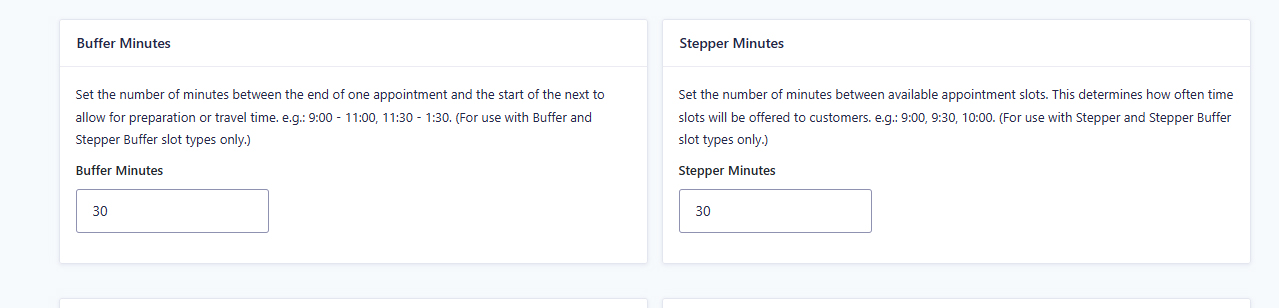
You can customize the Stepper and Buffer times by entering the desired duration in minutes for each option.
Be sure to test your booking forms to confirm that the time slots are displayed as you want them.